Clients
If your organization manages other organizations as clients or tenants, the organization switcher — top left of the console — lets you add a new one and move between them.
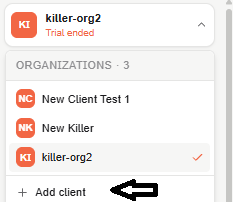
The switcher and its Add client control are available even if you only have access to a single organization — adding your first client doesn't require already managing more than one.
Add a client
Only available from a parent organization. While you're in a client organization's own context, there's no way to add one from there, even as Admin — a client created this way can't itself create further clients.
-
Open the organization switcher and select Add client.
-
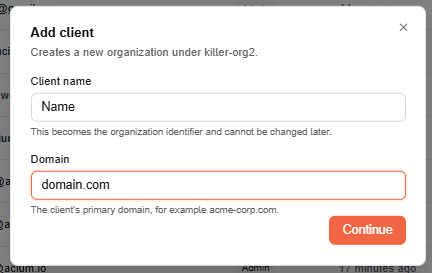
Enter the Client name and Domain — the only two fields asked for, and both required. Select Continue.
-
Review the name and domain, then select Create client.
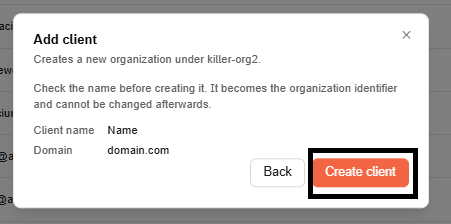
The new organization appears in your switcher immediately — no need to sign in again — and you can switch into it right away.
Client name rules
- Required, up to 50 characters.
- Can't contain
-org,org-, or the standalone wordorg. - Must be unique across the platform — if another organization already has that name, creation is rejected with the reason shown.
This becomes the organization's identifier and can't be changed afterward.
Domain
Required, but not unique — more than one organization can share the same domain, so an already-used one doesn't block creation.
What you get
The new organization is created as a child of the parent organization you created it from — not just loosely associated through your own access to both. Its administrator is created using your own credentials as the admin who performed the creation, so you have access to configure it immediately: its directory, policies, and deployment are all set up from inside that new organization, same as any other.
Access
Adding a client is restricted to the Admin role. An Editor or Viewer doesn't see the Add client control at all — it's absent, not disabled.