Browse
Browse is the read-only research surface for every extension installed across your fleet — search, filter, and drill into risk and permissions. To change an extension's install policy, permissions, or audience, use Extensions under Protect.
Find this section at Fleet > Extensions Catalog > Browse.
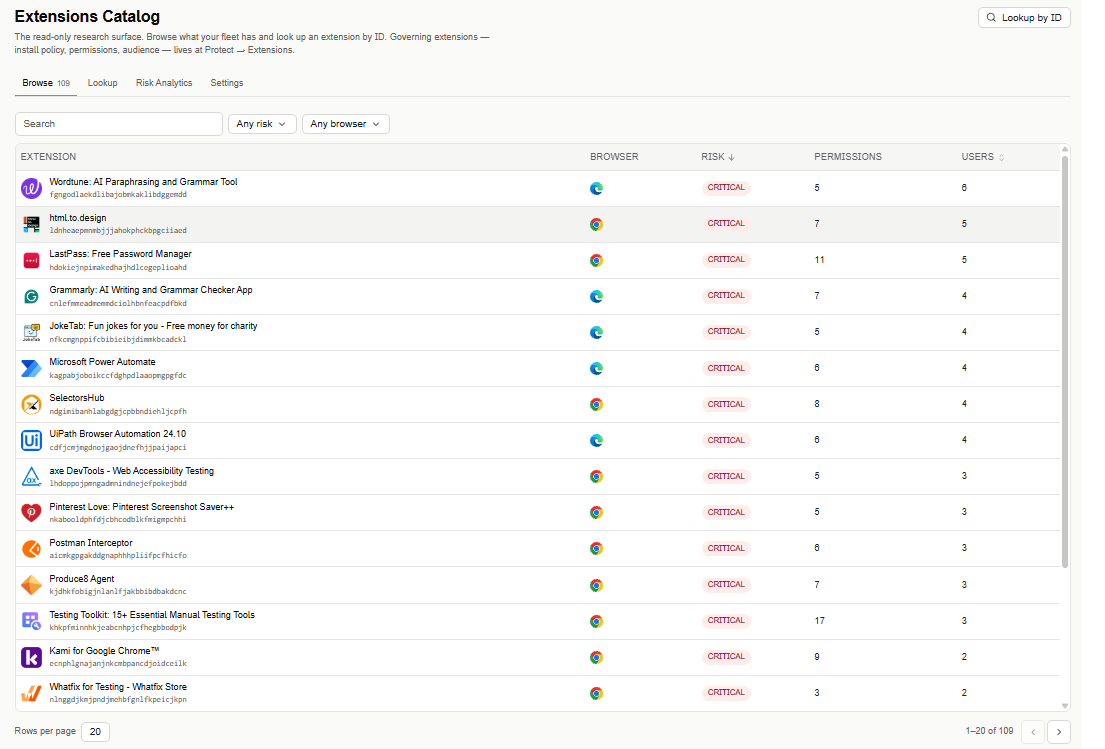
Extensions Catalog has four tabs — Browse, Lookup, Risk Analytics, and Settings — for researching, searching, and analyzing extensions across your fleet.
Filters
Narrow the table with a free-text search, plus Risk (defaults to Any risk) and Browser (defaults to Any browser) filters.
Select Lookup by ID (top right) to jump straight to the Lookup tab.
Extensions table
The table is paginated (20 rows per page by default) and lists one row per extension:
- Extension — the extension's name and ID.
- Browser — the browser it's installed on.
- Risk — its risk severity (for example, Critical); sorted highest first by default.
- Permissions — the number of permissions the extension requests.
- Users — the number of users who have it installed; sortable.
Select an extension's name to open its details — the same view you land on from Lookup.