Security Events
Security Events lists threat detections, policy violations, and AI and Data Controls events across your fleet.
Event schema (OCSF)
Every event's General fields — Event type, Severity, Activity, and Event category — follow the Open Cybersecurity Schema Framework (OCSF), an open standard for security event data:
| Field shown in the console | OCSF attribute |
|---|---|
| Event type | Class ID (class_uid) |
| Severity | Severity ID (severity_id) |
| Activity | Activity ID (activity_id) |
| Event category | Category ID (category_uid) |
Severity
Severity is an OCSF value from 0 to 99 — higher means more impact. For extension installation/enablement events, severity is derived from the extension's risk level.
| Value | Name | Meaning |
|---|---|---|
| 0 | Unknown | Severity is unknown. |
| 1 | Informational | No action required. |
| 2 | Low | The user decides if action is needed. |
| 3 | Medium | Action is required, but not urgent. |
| 4 | High | Action is required immediately. |
| 5 | Critical | Action is required immediately, broad scope. |
| 6 | Fatal | An error occurred; too late for remedial action. |
| 99 | Other | Severity doesn't map to a named value. |
Activity
Activity IDs are also on the 0–99 OCSF scale, but they're descriptive only — a higher or lower ID doesn't mean a more or less important event. The same ID range means something different per event type: an Authentication event's activity might display as "Logon", while a Web Resources Activity event uses the same range for something like "Read".
Identity and Access Management
Authentication and access-control activity: admin account management, sign-in/sign-out, and configuration/policy CRUD.
Account Change
| Trigger | Activity | Severity | Notes |
|---|---|---|---|
| An admin is added | Create | — | Actor is the admin who performed the action. |
| An admin is removed | Delete | — | |
| An admin resets their password | Password change | Informational |
Authentication
| Trigger | Activity | Severity | Notes |
|---|---|---|---|
| A user authenticates through the extension, or an admin through the console | Logon | Informational | |
| Authentication fails because the user doesn't exist | Logon · Failure | Low | Also covers an extension sign-in blocked by a disallowed domain. |
| Authentication fails for an existing user | Logon · Failure | Informational | Covers invalid credentials, a disabled or locked account, and an expired password — the specific reason is in the event's JSON detail. |
Entity Management
Configuration profile and policy assignment activity — not admin account changes, which are their own Account Change class above.
| Trigger | Activity | Severity | Notes |
|---|---|---|---|
| A policy assignment is created, updated, or deleted | Create / Update / Delete | Informational (create has none) | |
| A Web Control profile is created, updated, or removed | Create / Update / Delete | Informational | |
| A user is edited or deleted from the inventory | Update / Delete | — |
Browser Settings profile changes (create/update/delete) don't generate an Entity Management event yet — see Known gaps.
Discovery
The existence and state of devices, browsers, and users that Acium UBS has found.
Device Inventory Info
| Trigger | Activity | Severity | Notes |
|---|---|---|---|
| A user enrolls the extension or authenticates through it or a browser profile | Collect | Informational | Records IP, hostname, device type, OS details, and first/last seen. |
| A user authenticates through the extension (browser variant) | Collect | Informational | Records the browser itself as the device, rather than the underlying OS device. |
Device Config State Change
| Trigger | Activity | Severity | Notes |
|---|---|---|---|
| A device's location changes, or a new user connects to an already-known device | Collect | Informational | Narrower than the class name suggests — it only fires on these two triggers, not on every configuration or posture change. |
User Inventory Info
| Trigger | Activity | Severity | Notes |
|---|---|---|---|
| A user authenticates through the extension for the first time | Collect | Informational | Records full name, email, organization, and avatar image. |
Findings
Vulnerability Finding
| Trigger | Activity | Severity | Notes |
|---|---|---|---|
| A browser has a pending update | Create | Medium | Includes a description of the vulnerability. |
| A browser finishes updating | Close | Informational | |
| A browser's update status is unknown | Create | Unknown |
This class is easy to overlook — it isn't a browsing or identity event, it's browser patch-status telemetry reported through the same events pipeline.
Application Activity
Web Resources Activity
The highest-volume event class — roughly 84% of all recorded events.
| Trigger | Activity | Severity | Notes |
|---|---|---|---|
| Any web access, allowed or blocked | Read | Informational (allowed) / Medium (blocked) | Malware and phishing blocks are not a separate class — same class, with threat-intelligence detail attached. |
Application Lifecycle
| Trigger | Activity | Severity | Notes |
|---|---|---|---|
| An extension is installed | Install | The extension's risk severity | |
| An extension is uninstalled | Remove | Informational | |
| An extension is enabled | Enable | The extension's risk severity | |
| A Browser Routing rule intercepts a URL and relaunches it in the target browser | Start | Informational | Records the target browser, the URL, the matching policy, the device, the source browser, and the user signed in to the extension at the time. |
The Browser Routing row is a recent addition to this class — an older event export may not include it.
Known gaps
Not every configuration surface has a dedicated event class yet:
- Browser Settings profiles — no event when a profile is created, updated, or deleted.
- Data Control / DLP rule actions — blocking copy/paste, upload/download, camera/mic, or masking sensitive data doesn't have a dedicated event class. When a rule fires, it's recorded as detail on a generic Web Resources Activity event rather than as its own Event type.
- Browser Routing coverage — the routing event itself is logged (see Application Lifecycle above), but there's no fleet-wide metric yet for how many users have a Browser Routing profile assigned.
In the console
Find this section at Watch > Activity > Security Events.
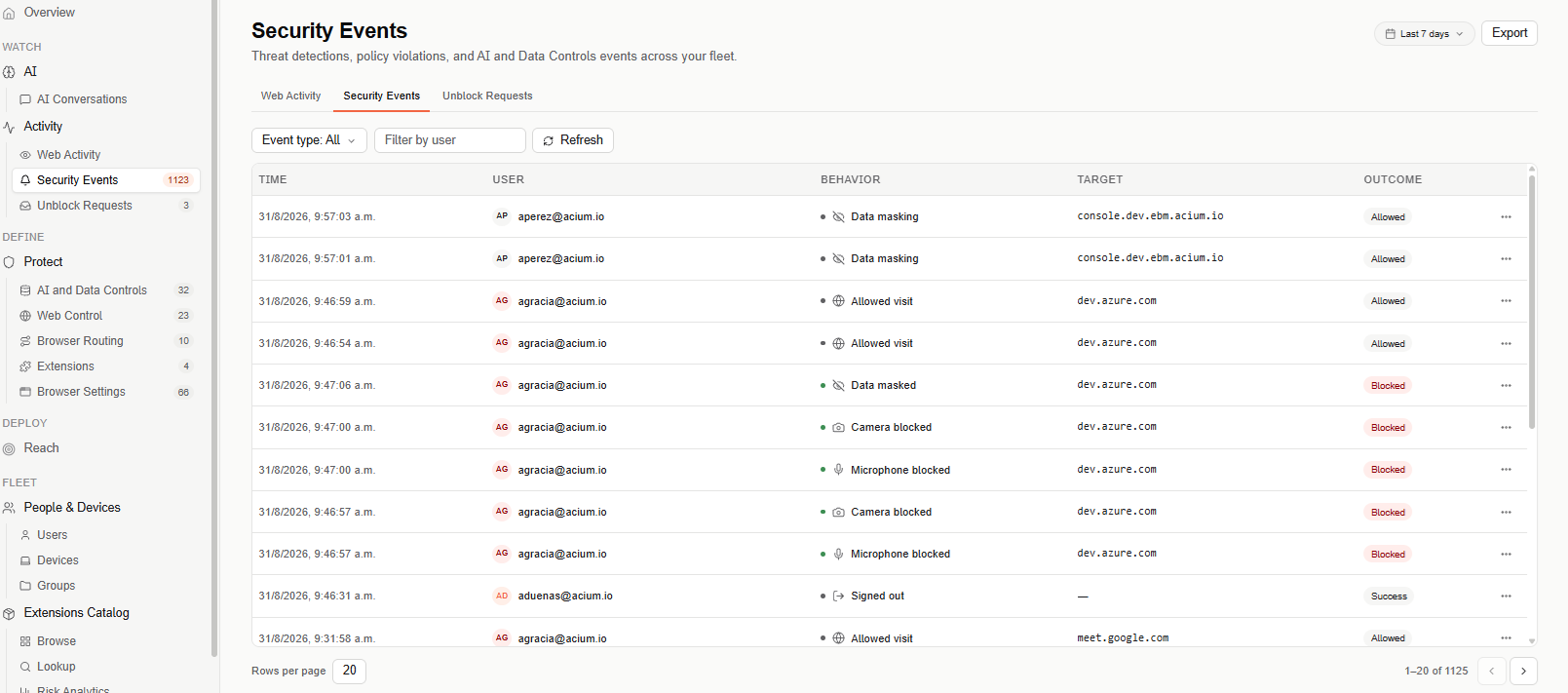
Security Events shares its header with Web Activity and Unblock Requests — use the tabs above the table to switch between the three Activity views.
Filters
Narrow the table with Event type (defaults to All) and Filter by user (search by user email). Select Refresh to reload the table against your current filters.
The date range selector (top right) defaults to Last 7 days, and can be widened to Last 30 days or Last 90 days.
Events table
The table is paginated (20 rows per page by default) and lists one row per event:
- Time — when the event occurred.
- User — who triggered the event.
- Behavior — the detected action (for example, Data masking, Allowed visit, Download, Signed in, Signed out), with an icon.
- Target — the URL or host the behavior applied to.
- Outcome — the result of the event (for example, Allowed, Success).
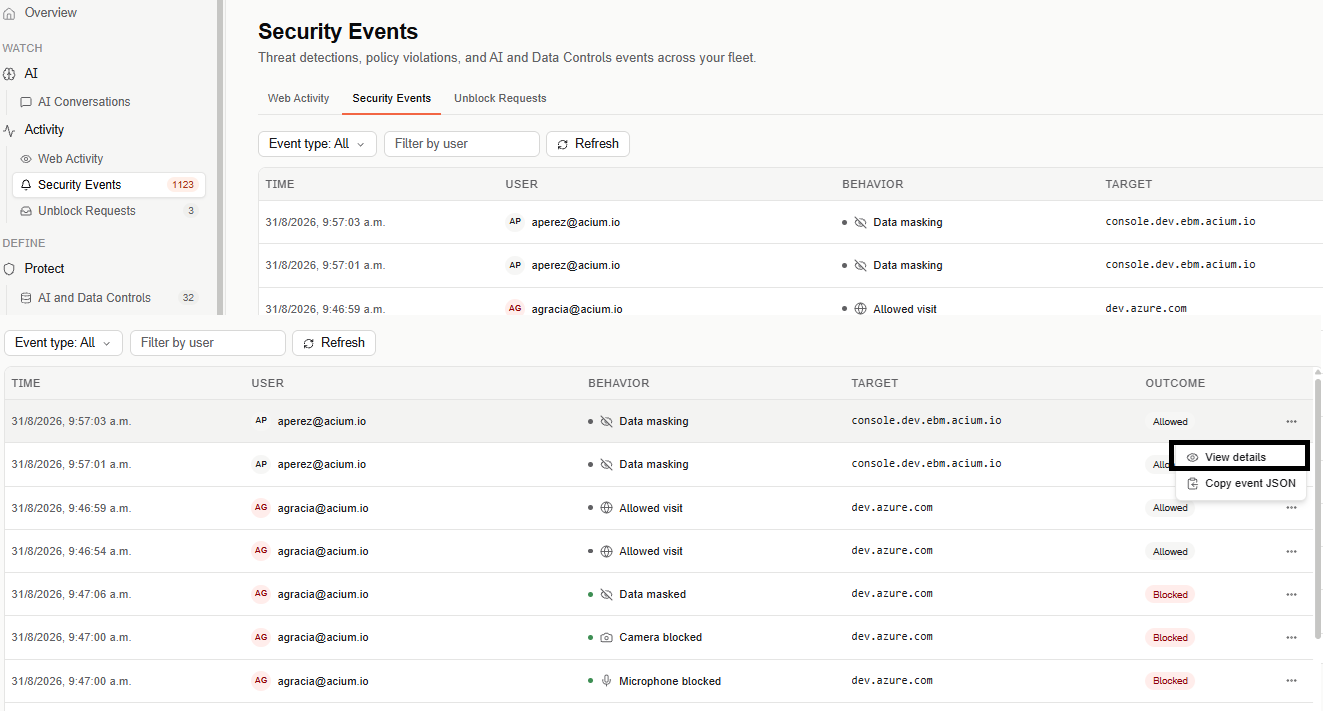
Each row has a ⋯ menu with two actions:
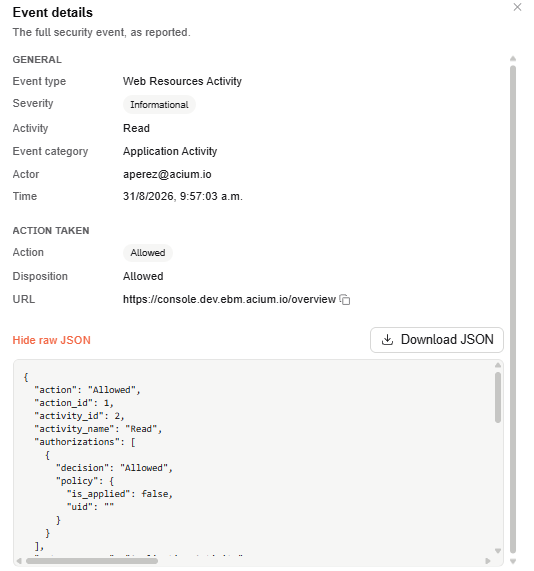
- View details — opens a modal with the full event as reported: a General section (Event type, Severity, Activity, Event category, Actor, Time) and an Action taken section (Action, Disposition, URL). Below that, Show raw JSON / Hide raw JSON toggles an inline view of the event's full JSON, and Download JSON saves that JSON as a file — two separate actions, view vs. save.
- Copy event JSON — copies the event's raw JSON to the clipboard directly, without opening the modal.
Export
Select Export (top right) to download the currently filtered events as a CSV file.